Ford’s pre-1996 OBD1 systems speak a language of flashing check-engine lights and jumper-wire gymnastics that turns a simple diagnostic session into a patience test. The right tool strips that guesswork away, delivering clean numeric codes and letting you focus on the fix rather than the ritual.
I’m Amir — the founder and writer behind Four Wheel Ask. My work centers on cross-referencing technical specifications, analyzing owner-reported long-term reliability data, and comparing build quality across dozens of diagnostic tools to identify which ones actually hold up in a driveway environment.
After wading through owner feedback and comparing build quality across multiple diagnostic platforms, I have selected the best ford obd1 scanner.
How To Choose The Best Ford OBD1 Scanner
Selecting the right OBD1 scanner for your Ford, Lincoln, or Mercury comes down to matching the tool to the computer system under the hood and the kind of work you plan to do. A dedicated code reader simplifies the process, but understanding a few key factors ensures you don’t end up with a mismatch.
Compatibility: EEC-IV vs. MCU Systems
Ford used two primary computer architectures during the OBD1 era. EEC-IV (Electronic Engine Control IV) covers the vast majority of Ford vehicles from the early 1980s through 1995, including trucks and passenger cars. MCU (Microprocessor Control Unit) systems appeared in some earlier models and specific applications. A quality OBD1 scanner supports both, so verify the product description explicitly mentions EEC-IV and MCU before buying.
Standalone Reader vs. FORScan Adapter
Standalone code readers like the INNOVA 3145 provide instant code readout on an integrated display with no laptop required — perfect for quick diagnostics on older vehicles. FORScan-compatible adapters (ELM327-based or the OBDLink EX) connect to a Windows PC and unlock advanced functions: module programming, keyless entry configuration, PATS (Passive Anti-Theft System) access, and bidirectional controls. Choose the approach that matches your willingness to involve a laptop.
Build Quality and Connector Durability
OBD1 connectors use spring-loaded pins that insert into the vehicle’s diagnostic port. Over time, cheaply constructed pins can recede into the housing, causing intermittent connections. Look for reinforced nickel-plated pins, a strain-relieved cable (ideally 6–9 feet for cabin operation), and a housing that survives occasional drops onto concrete.
Quick Comparison
On smaller screens, swipe sideways to see the full table.
| Model | Category | Best For | Key Spec | Amazon |
|---|---|---|---|---|
| OBDLink EX FORScan Adapter | USB Adapter | Deep FORScan programming | Electronic CAN switch, 500 kbit/s | Amazon |
| INNOVA 3170RS | All-in-One | OBD1 + OBD2 + ABS/SRS | 2.8″ color screen, live data | Amazon |
| INNOVA 3145 + Extension Bundle | Standalone Reader | One-person cabin operation | 9 ft total cable, code memory | Amazon |
| JOPLAY OBD1 Code Reader | Standalone Reader | Code definitions on screen | 2.4″ LCD, 9 ft cable | Amazon |
| INNOVA 3145 | Standalone Reader | Pure OBD1 simplicity | Digital display, MCU/EEC-IV | Amazon |
| CTobd Elm327 USB | USB Adapter | Budget FORScan access | MS/HS-CAN switch, OBD2 protocols | Amazon |
| OHP FORScan ELM327 | USB Adapter | Entry-level FORScan tool | FTDI driver, 500 kbit/s | Amazon |
In‑Depth Reviews
1. OBDLink EX FORScan OBD Adapter

The OBDLink EX is the only adapter on this list officially recommended by the FORScan development team, and that endorsement carries real weight. Instead of a manual toggle switch, it uses an electronic switch that lets FORScan access all CAN buses simultaneously — HS-CAN, MS-CAN, and the proprietary Ford protocols — without you flipping a physical switch between tests. The throughput reaches up to 20 times faster than toggle-switch adapters, which matters when you are logging live data or performing module programming.
Build quality is noticeably higher than typical ELM327 clones. The housing feels dense, the USB cable provides a rock-solid connection that resists data corruption, and the driver installation is straightforward on Windows systems. Owner reports consistently highlight the ability to perform dealership-level diagnostics — from PATS key programming to ABS module configuration — on vehicles ranging from a 2000 F-450 to a 2020 Mustang. The adapter also supports all OBD2 protocols, so it remains useful if you move to a newer Ford.
The only genuine drawback is the requirement for a Windows laptop or tablet; there is no standalone display. You also need to download FORScan separately and obtain an Extended License (free trial available) for advanced programming features. For anyone who wants the deepest possible access to Ford’s electronic systems without paying dealer rates, this is the tool.
What works
- Electronic CAN switch enables advanced FORScan features
- Up to 20x faster throughput than toggle adapters
- Rock-solid connection with no dropped packets
- Works across OBD1-era FORScan vehicles and modern OBD2
What doesn’t
- Requires Windows PC — no standalone operation
- Extended License needed for programming functions
- Premium price compared to basic ELM327 cables
2. INNOVA 3170RS OBD1 & OBD2 Scanner

The INNOVA 3170RS is the most feature-dense scanner in this lineup, bridging the gap between vintage OBD1 diagnostics and modern OBD2 functionality. It ships with a dedicated Ford OBD1 adapter plus a GM adapter, covering EEC-IV and MCU systems on Ford, Lincoln, and Mercury vehicles from 1981 to 1995. Beyond basic code reading, it performs ABS bleed procedures, SRS (airbag) diagnostics, oil life reset, brake pad life checks, and live data graphing — making it a serious tool for a multi-vehicle household.
The 2.8-inch color display provides clear readouts, and the bundled RepairSolutions2 app (available via Bluetooth on OBD2 vehicles) gives verified fixes, part numbers, and recall information. Owner feedback on the OBD1 side is positive for code retrieval and clearing, though some users report that SRS reset functionality is not universally supported across all Ford models. The unit is powered through the OBD2 port, so no batteries are required. The included quick-start guide and English/Spanish/French language support lower the learning curve.
Where the 3170RS stumbles is its OBD1 adapter — the pins on the extension cable have been reported by multiple owners to shift downward after repeated use, requiring manual re-seating. The price point is also significant, placing it firmly in enthusiast territory. If you work on both pre-1996 Fords and newer vehicles, the versatility justifies the investment; for pure OBD1 work, a dedicated reader offers better value.
What works
- Covers OBD1 and OBD2 in one package
- ABS bleed, SRS, and live data capabilities
- Color display with clear code definitions
- Wired and Bluetooth connectivity options
What doesn’t
- OBD1 adapter pins can shift over time
- SRS reset not universal across Ford models
- Higher investment than standalone readers
3. INNOVA 3145 Ford Digital OBD1 Code Reader + Extension Cable Bundle
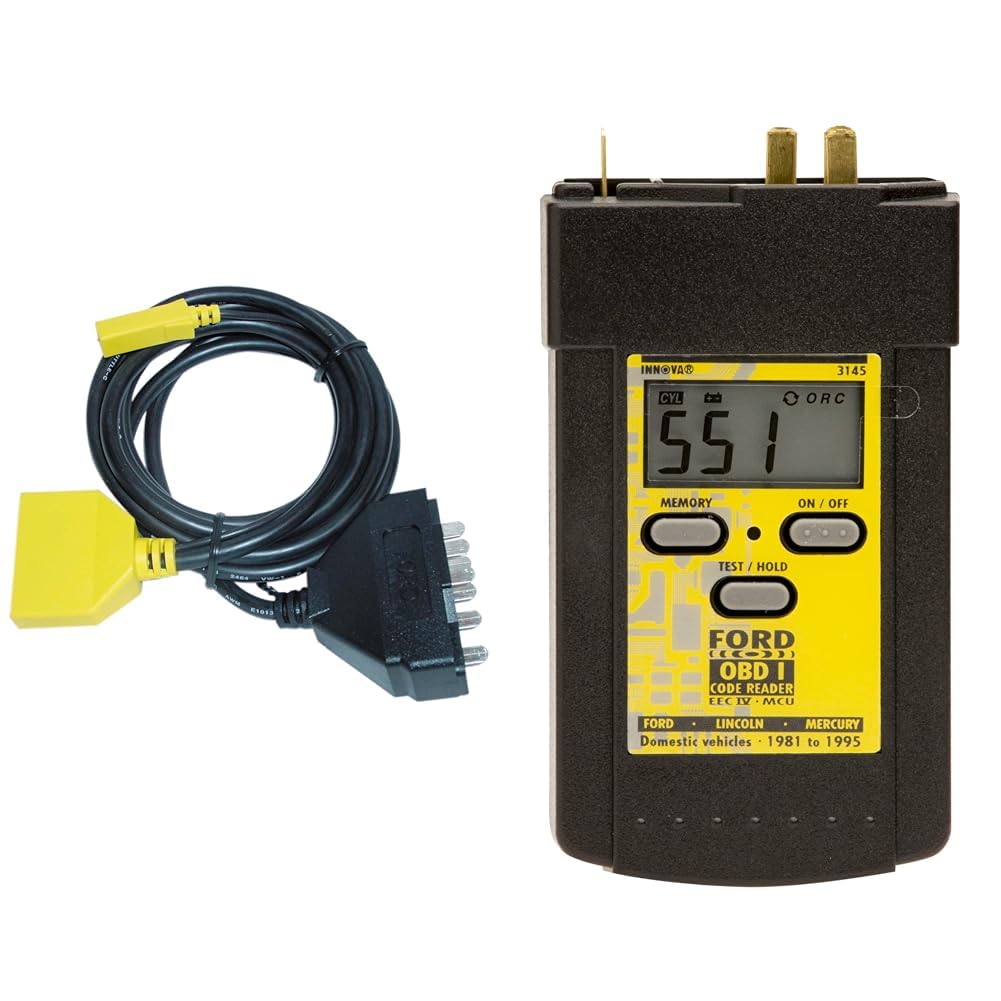
This bundle pairs the proven INNOVA 3145 digital code reader with a 6-foot heavy-duty extension cable, solving the biggest ergonomic problem of OBD1 diagnostics: reaching the driver’s seat while the tool is plugged into the diagnostic port under the hood. The extension cable features separate connectors for MCU and EEC-IV systems, and the combined 9-foot length lets you sit behind the wheel, run the self-test, and read codes without recruiting a helper to watch the tool.
The 3145 itself is a purpose-built OBD1 reader that displays numeric trouble codes on a digital screen — no flash counting, no guesswork. It stores the last codes in memory even after unplugging, which is useful when you need to research a code without keeping the tool connected. Coverage spans Ford, Lincoln, and Mercury cars and trucks from 1982 through 1995. Owner reports praise its simplicity: plug in, turn the key, and read the number.
The shared criticism with the standalone 3145 applies here too — the pins on the connector can slide down into the housing over time, requiring occasional manual repositioning. A dab of adhesive at the base resolves the issue for most users. The bundle also does not include batteries (the reader requires two AA cells). For anyone who regularly diagnoses older Fords and values cabin convenience, this bundle is the most practical configuration.
What works
- Extension cable enables one-person operation
- Digital display eliminates flash counting
- Code memory survives unplugging
- Works across EEC-IV and MCU systems
What doesn’t
- Connector pins may shift over repeated use
- Requires 2 AA batteries (not included)
- No live data or advanced programming
4. JOPLAY OBD1 Code Reader Compatible with Ford
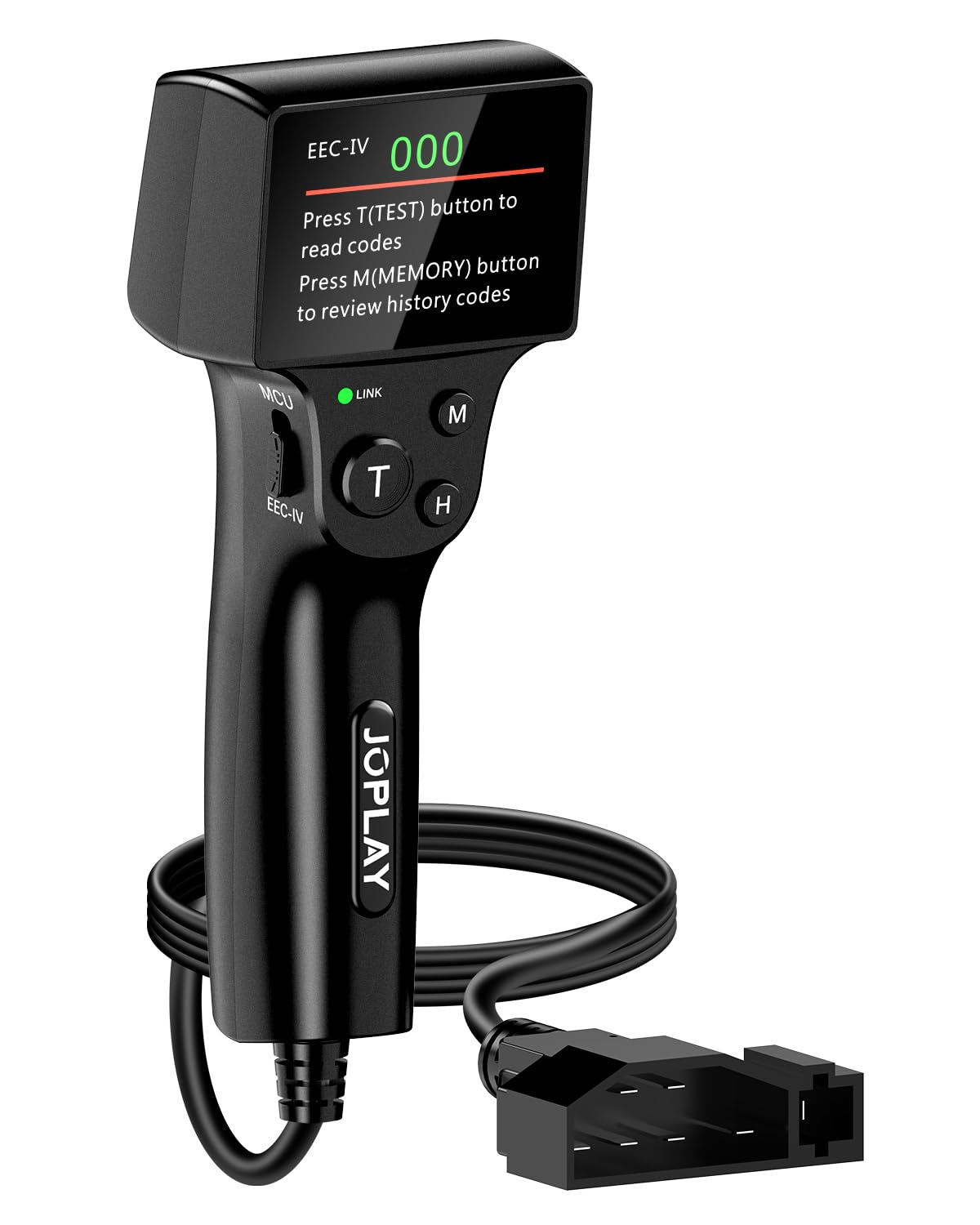
The JOPLAY OBD1 reader differentiates itself by displaying code definitions directly on a 2.4-inch LCD screen, removing the step of cross-referencing a printed code list. It supports Ford, Lincoln, and Mercury vehicles from 1981 through 1995, covering both EEC-IV and MCU architectures. The reader offers three diagnostic self-tests — KOEO (Key On Engine Off), CM (Continuous Memory), and KOER (Key On Engine Running) — giving a complete picture of stored and active faults.
Build quality is a step above budget readers. The housing is reinforced for drop resistance, the nickel-plated pins resist corrosion and bending, and the 9-foot cable provides generous reach into the cabin. The ergonomic handle makes it comfortable to hold during extended diagnostics. Owner feedback consistently notes that the tool is simple to use straight out of the box, with no driver installation or software setup required. It runs on 2 AA batteries, keeping the design wireless and portable.
The trade-off is that the JOPLAY does not support ABS code reading — it focuses purely on engine and powertrain diagnostics. The instruction manual is printed in English, French, and Spanish, though some users find the code definition library less comprehensive than INNOVA’s. It is also a dedicated OBD1 tool, so it has no utility on 1996-and-later vehicles. For a home mechanic with a single older Ford, it strikes a fine balance between convenience and cost.
What works
- Built-in code definitions on bright LCD
- Drop-proof reinforced housing
- 9-foot cable for cabin use
- No software or driver installation
What doesn’t
- No ABS code reading support
- Code library not as deep as some competitors
- OBD1-only — no crossover to newer vehicles
5. INNOVA 3145 Ford Digital OBD1 Code Reader

The INNOVA 3145 is the most recognized name in Ford OBD1 diagnostics, and for good reason. It is a dedicated, single-purpose tool that reads numeric trouble codes from EEC-IV and MCU control systems on Ford, Lincoln, and Mercury vehicles built between 1982 and 1995. The digital display shows the code number directly — no flash patterns to interpret, no second person required to count blinks. The included instruction manual provides a full list of Ford-specific codes and explains how to run KOEO, KOER, and continuous memory self-tests.
One of the 3145’s standout features is its memory: after unplugging the reader, it retains the last retrieved codes, allowing you to research the fault without keeping the tool connected. The unit is powered through the vehicle’s diagnostic port, so there are no batteries to replace. Owners consistently describe the build as professional-grade, with a solid feel that inspires confidence. The device has been used to fix everything from a 1992 Chevy truck (using the GM-compatible mode) to a 1995 Ford F-150 with a sputtering idle.
The recurring criticism is the connector pins, which multiple long-term users report can slide downward into the housing after several connection cycles. A simple fix — applying a small amount of adhesive at the base of each pin — resolves the problem permanently. The 3145 also lacks an extension cable in the base package, meaning you typically need to reach the port from outside the vehicle or recruit a helper. For pure OBD1 reading with no software complexity, it remains the benchmark.
What works
- Simple digital code readout — no flash counting
- Code memory survives disconnection
- Professional-grade build quality
- Clear English instructions with full code list
What doesn’t
- Connector pins may recede with heavy use
- No extension cable included
- OBD1-only — no crossover capability
6. CTobd Elm327 USB FORScan Adapter

The CTobd Elm327 USB adapter aims to deliver FORScan compatibility at a straightforward price point. It includes a physical MS-CAN / HS-CAN toggle switch, giving you access to both bus types on Ford, Lincoln, Mercury, and Mazda vehicles. The adapter supports all OBD2 protocols — J1850PWM, HS-CAN, MS-CAN, and more — making it functional as a standard code reader on any 1996-or-later vehicle. Software compatibility covers all Windows versions from XP through 10.
Owner reports highlight the adapter’s ability to enable popular FORScan modifications: global window open/close, Bambi mode (fog lights with high beams), tire size correction, secure idle, and the 5-turn signal flash. Several users report saving significant money by resetting modules themselves — one owner restored electric power steering on a Ford Fusion using the adapter and a YouTube tutorial. The included driver CD and straightforward installation process get most users online within minutes.
The main concerns center on consistency. A small but notable subset of buyers report that the adapter is not fully supported by FORScan for all functions, particularly on certain 2019-and-later Mazda models. The physical toggle switch is also less convenient than the electronic switching found on the OBDLink EX, as you must manually select the correct bus before each diagnostic session. For a budget-conscious owner working on a single compatible vehicle, the CTobd adapter delivers functional results.
What works
- MS/HS-CAN switch covers Ford bus architectures
- Supports popular FORScan programming features
- Works as standard OBD2 scanner on newer cars
- Easy driver installation on Windows
What doesn’t
- Inconsistent FORScan support across all models
- Manual toggle switch less convenient than electronic
- Some users report limited functionality on newer Mazda
7. OHP FORScan ELM327-based OBD2 to USB Diagnostic Scan Tool
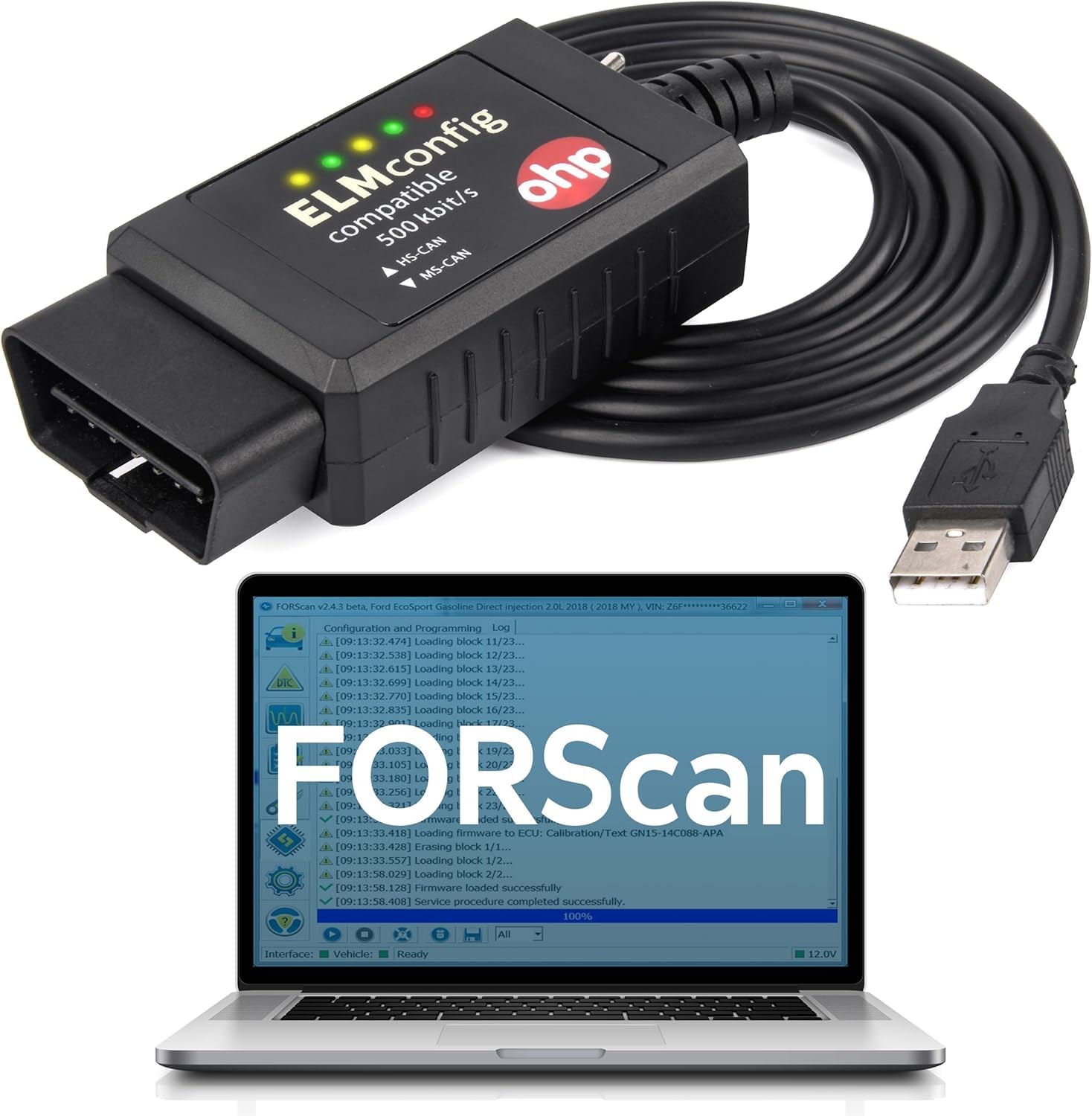
The OHP ELM327 adapter occupies the entry-level slot in the FORScan ecosystem, offering a USB-connected diagnostic cable for Ford, Lincoln, Mazda, and Mercury vehicles. It uses the FTDI chipset — widely regarded as more reliable than cheap CH340 clones — and supports bus speeds from 19,200 baud up to 500,000 baud. Compatibility covers 12V vehicles only and spans most Ford models from the early 2000s through current production, including the F-Series, Mustang, Transit, and Escape.
Owner feedback skews positive for basic diagnostic use. One user with a 2001 Ford experiencing a PATS (Passive Anti-Theft System) no-start condition used the adapter with FORScan to identify the fault and avoided a dealer repair that would have cost hundreds. Others report successful module programming and feature customization on Super Duty trucks. The adapter requires a Windows environment — macOS, Chromebook, and mobile devices are not supported unless running a full Windows emulator.
The most common frustration is the “adapter not found” error that occurs when Windows does not automatically install the FTDI driver. The fix involves manually downloading the driver from the FTDI website and lowering the COM port number in Device Manager — a straightforward process but an extra step that surprises first-time users. The 2-year manufacturer warranty provides some peace of mind at this price tier. For a low-cost entry into FORScan diagnostics, the OHP adapter delivers the essentials without unnecessary frills.
What works
- Reliable FTDI chipset avoids clone issues
- 2-year manufacturer warranty
- Supports wide range of Ford, Lincoln, Mazda models
- Capable of PATS diagnostics and module programming
What doesn’t
- Driver installation can be non-automatic
- Windows-only — no macOS or mobile support
- No electronic CAN switching
Hardware & Specs Guide
EEC-IV vs. MCU Systems
Ford’s EEC-IV (Electronic Engine Control IV) debuted in the early 1980s and became the dominant engine management platform through 1995. It uses a standardized 6-pin or 12-pin diagnostic connector, depending on the vehicle. MCU (Microprocessor Control Unit) systems appeared on some Ford models in the late 1970s and early 1980s, using a different communication protocol. A true Ford OBD1 scanner must support both architectures — the INNOVA 3145 and JOPLAY explicitly cover EEC-IV and MCU, while FORScan adapters rely on the vehicle’s OBD2 port on later models.
KOEO, KOER, and Continuous Memory Tests
Ford OBD1 self-tests break down into three categories. Key On Engine Off (KOEO) checks sensors and circuits with the engine not running. Key On Engine Running (KOER) evaluates system performance under idle conditions. Continuous Memory (CM) stores intermittent faults that occurred during previous driving cycles. A comprehensive diagnostic session runs all three tests. Standalone readers like the INNOVA 3145 and JOPLAY walk you through these tests step by step, while FORScan adapters perform them within the software interface.
CAN Bus Types — MS-CAN vs. HS-CAN
Ford vehicles use two Controller Area Network (CAN) buses for module communication. HS-CAN (High-Speed CAN) handles powertrain and chassis modules at 500 kbit/s. MS-CAN (Medium-Speed CAN) runs at 125 kbit/s and manages body electronics like door modules, instrument clusters, and comfort systems. FORScan adapters with a physical toggle switch require you to manually select the correct bus for the module you want to access. The OBDLink EX uses an electronic switch that lets the software handle bus selection automatically, streamlining the process.
Standalone Reader vs. FORScan Adapter Workflow
A standalone OBD1 reader (INNOVA 3145, JOPLAY) provides instant code readout with no external device — plug it in, read the code, look it up, and clear it. The workflow is simple and fast, ideal for quick checks. A FORScan adapter (OBDLink EX, CTobd, OHP) requires a Windows laptop, driver installation, and software download. The payoff is access to bidirectional controls, module programming, and live data logging. Choose standalone for speed and simplicity; choose FORScan for depth and customization capability.
FAQ
What is the difference between OBD1 and OBD2 on Ford vehicles?
Will a FORScan adapter work on my 1993 Ford F-150?
Can I clear check engine codes on a Ford OBD1 system?
What does the Bambi mode feature do on FORScan?
Do I need a laptop for a standalone OBD1 reader?
Final Thoughts: The Verdict
For most buyers, the best ford obd1 scanner winner is the OBDLink EX FORScan Adapter because it offers the deepest diagnostic access to Ford’s electronic systems and is officially recommended by the FORScan team. If you want pure plug-and-play simplicity with code definitions on a screen, grab the JOPLAY OBD1 Code Reader. And for a proven dedicated reader that has been the garage standard for years, nothing beats the INNOVA 3145.

Certification: BSc in Mechanical Engineering
Education: Mechanical engineer
Lives In: 539 W Commerce St, Dallas, TX 75208, USA
Md Amir is an auto mechanic student and writer with over half a decade of experience in the automotive field. He has worked with top automotive brands such as Lexus, Quantum, and also owns two automotive blogs autocarneed.com and taxiwiz.com.