The factory Sync screen in the Ford Maverick does the basics, but its small size and sluggish interface leave many drivers wanting more from their daily commute or road trip. Whether you need crisp GPS mapping, wireless smartphone integration, or a display that actually feels modern, upgrading that dashboard screen transforms the entire cabin experience.
I’m Amir — the founder and writer behind Four Wheel Ask. I’ve spent years analyzing automotive electronics market specs, build quality, and aggregated owner feedback to identify which aftermarket head units deliver real-world performance and lasting durability in the Ford Maverick platform.
After reviewing compatibility, processor specs, display resolution, and real owner experiences, this guide breaks down the best options to find your ideal ford maverick screen upgrade.
How To Choose The Best Ford Maverick Screen Upgrade
Not every aftermarket screen works seamlessly with the Maverick’s electrical architecture. The factory Sync system communicates through specific data protocols, so compatibility with the vehicle’s CANbus network determines whether features like steering wheel controls, backup camera, and HVAC displays function correctly after installation.
Processor and RAM — The True Engine of Responsiveness
Maverick cab space gets hot in summer, and a weak processor causes laggy touch response, slow app loading, and Bluetooth audio dropouts. Units with at least 4GB of RAM and an octa-core processor (Qualcomm or Rockchip) handle multitasking like split-screen navigation with Spotify without stuttering. Budget units with 2GB RAM often freeze after a few months of real use.
Screen Resolution and Panel Type
A 1024×768 IPS panel looks crisp in direct sunlight, while cheaper TN displays wash out when you tilt the screen or glare hits the dash. For the Maverick’s slightly reclined dash angle, an IPS panel with 1920×1200 resolution (2K) delivers the best visibility and color reproduction. The physical size matters too — 12.1-inch Tesla-style vertical units fill the center stack dramatically, while 10-inch landscape units retain a more factory-like appearance.
Wireless CarPlay and Android Auto Integration
Factory wired connections are outdated. Look for units with built-in wireless modules that connect your iPhone or Android phone the moment you enter the cab. The best units use Zlink or AutoKit software with stable Bluetooth pairing, so you never fumble with USB cables again. Be aware that some brands lock wireless CarPlay behind a physical USB dongle, which consumes one of your console ports permanently.
Quick Comparison
On smaller screens, swipe sideways to see the full table.
| Model | Category | Best For | Key Spec | Amazon |
|---|---|---|---|---|
| Inexaccessories 14.5-Inch Mustang Unit | Premium | Maximum performance & clarity | 8GB RAM + 128GB ROM, 2K IPS | Amazon |
| Toeeklsa F150 14.4-Inch 8+128G | Premium | Qualcomm speed with Sync-3 retention | 8GB RAM + 128GB ROM, Qualcomm CPU | Amazon |
| NAKEVICH 14.4-Inch Tesla Style | Premium | Large display with physical HVAC controls | 8GB RAM + 128GB ROM, Snapdragon 665 | Amazon |
| Electrosmart 12.1-Inch F150 Unit | Mid-Range | Solid hardware with split-screen | 4GB RAM + 64GB ROM, Android 14 | Amazon |
| SSXIE 12.1-Inch F150 Replacement | Mid-Range | Entry-level large screen on a budget | 2GB RAM + 32GB ROM, 4K video support | Amazon |
| MekedeTech 10-Inch Mustang Unit | Budget | Affordable wireless CarPlay upgrade | 4GB RAM + 32GB ROM, 10-inch IPS | Amazon |
| LINKSWELL GEN 5 12.1-Inch | Premium | Factory-matched bezel with physical knobs | 4GB RAM + 64GB ROM, physical HVAC controls | Amazon |
In‑Depth Reviews
1. Inexaccessories 14.5-Inch Qualcomm Unit for Mustang 2015-2023
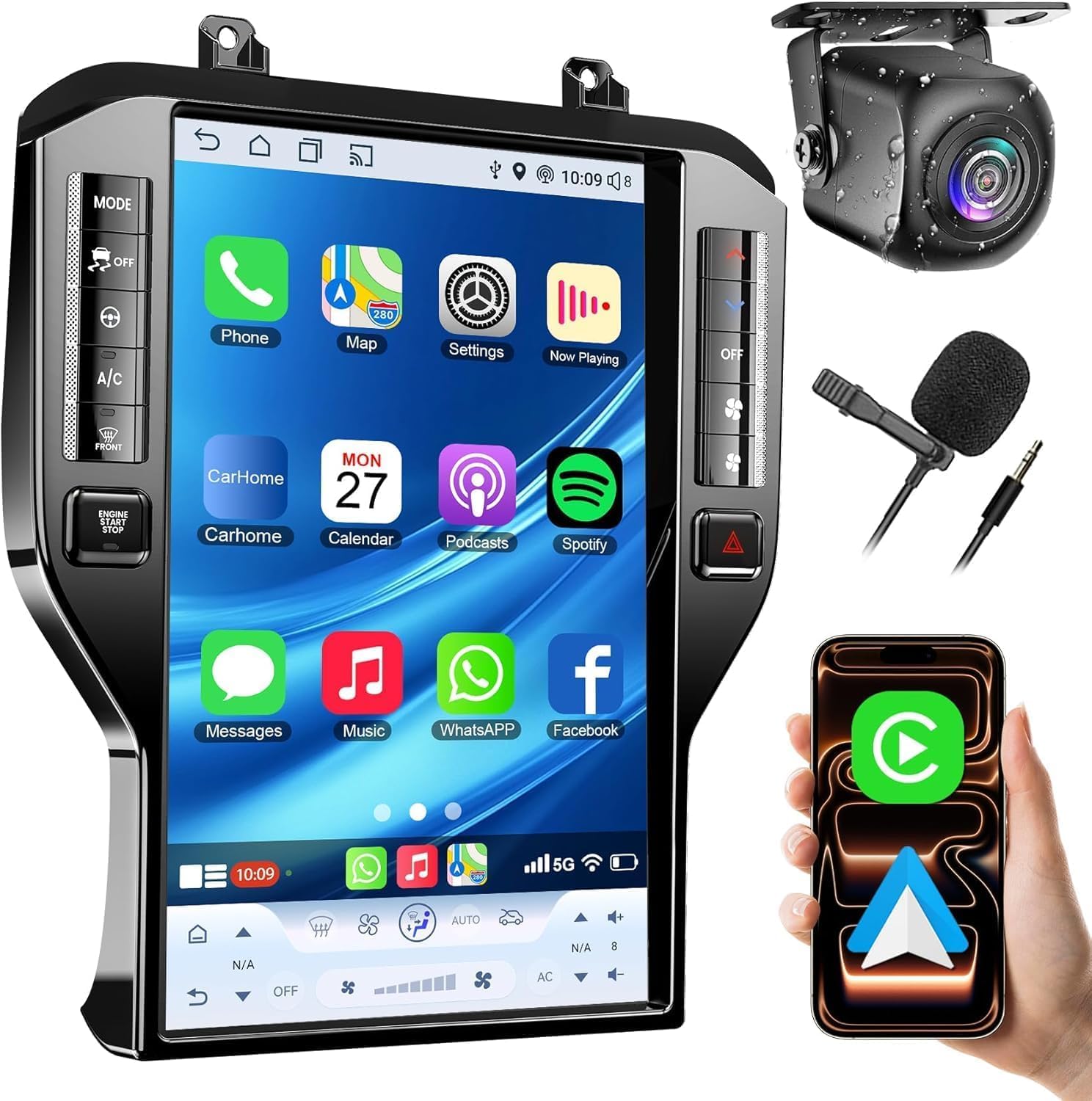
This 14.5-inch unit runs on an Android 13 operating system powered by a Qualcomm octa-core processor with 8GB of RAM and 128GB of internal storage — the most robust hardware in this comparison. The 2K (1920×1200) IPS panel delivers sharp text for navigation and vibrant colors for video playback, outperforming the typical 1024×768 screens found in more affordable competition.
Wireless CarPlay pairs reliably via the built-in module, and the split-screen function genuinely handles multitasking like Waze alongside Spotify without perceivable frame drops. The included HD backup camera with 170-degree viewing angle and IP69 waterproof rating ensures reliable reverse visibility regardless of weather.
The cons are mostly about form factor — at 14.5 inches, this screen dominates the dash and may look oversized in the Maverick’s cab compared to the factory unit. Some users also report having to download an app for full DSP equalizer control rather than having it baked into the settings menu. But for raw processing power and display quality, this is the most future-proof option listed.
What works
- Qualcomm 8-core processor handles multitasking smoothly
- 1920×1200 resolution IPS display is sharp and bright outdoors
- 8GB RAM + 128GB ROM offers plenty of room for apps and maps
What doesn’t
- 14.5-inch screen overhangs some of the dash bezel
- DSP equalizer requires third-party app installation
2. Toeeklsa 14.4-Inch 8+128G for Ford F150 2015-2021 (Sync-3)
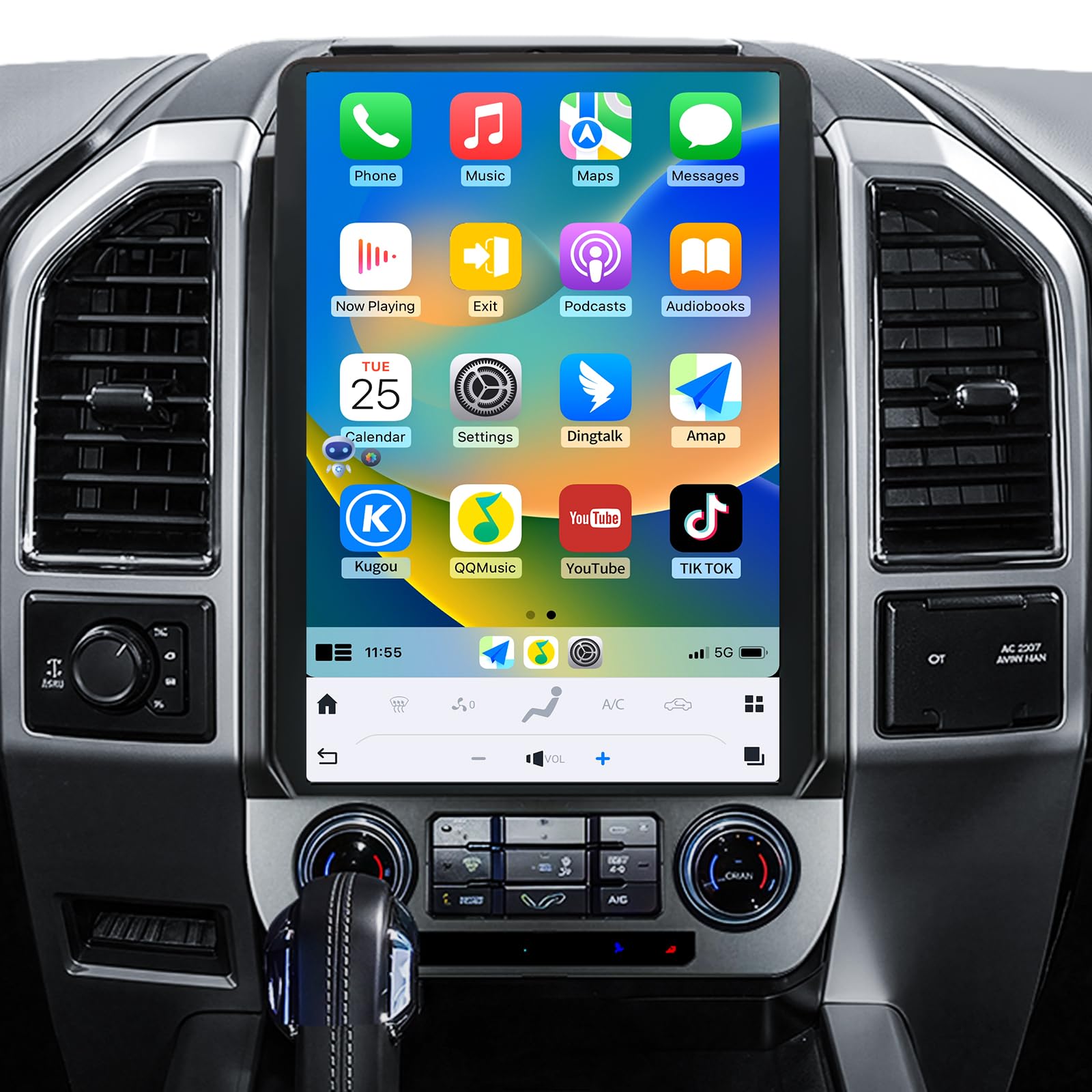
This unit specifically retains the factory Sync module, meaning you preserve OEM features like A/C information display, door open warnings, and the factory amplifier integration while upgrading to a massive 14.4-inch Tesla-style touchscreen. The Qualcomm processor paired with 8GB of RAM and 128GB of ROM provides fluid navigation and app responsiveness similar to a modern flagship tablet.
The 16-band equalizer with subwoofer output gives you granular control over the interior soundstage, and the unit supports both wireless Apple CarPlay and Android Auto. The installation kit relocates the original Sync module behind the screen, so you keep full factory functionality without losing your steering wheel controls or backup camera.
Reliability concerns pop up in longer-term ownership reports, with some displays exhibiting touch dead zones after several months in hot cabins. The interface also lacks the polish of a well-known aftermarket brand, requiring some trial-and-error setup to access all features. But for Maverick owners who want a massive screen without sacrificing factory Sync functions, this is the best balance found.
What works
- Keeps original SYNC-3 module for full factory feature retention
- 16-band EQ with subwoofer output for serious audio tuning
- Wireless CarPlay and Android Auto work without a separate dongle
What doesn’t
- Some units develop touch issues after extended heat exposure
- Interface setup requires patience and multiple configuration menus
3. NAKEVICH 14.4-Inch Qualcomm Android 11 for Ford F150 2015-2021

The Snapdragon 665 processor inside this NAKEVICH unit is a proven automotive-grade chip that balances performance with thermal efficiency — important for the Maverick’s sun-drenched dash. The 14.4-inch screen uses a true IPS panel with good viewing angles, and the integrated physical climate control knobs mean you don’t have to swipe through menus to adjust cabin temperature while driving.
This unit supports 4G LTE via a SIM card slot, allowing true standalone connectivity without depending on your phone hotspot. Wireless CarPlay and Android Auto connect quickly after initial pairing, and the 8GB RAM allocation keeps maps persistent in memory so navigation doesn’t reload every time you switch from music to Google Maps and back.
Watch out for blank screen episodes reported by some owners — occasionally the display refuses to wake up, requiring a SIM card eject pin to force a reboot. The Android 11 operating system is also dated compared to newer Android 13 and 14 units, though it still runs CarPlay and navigation perfectly fine. If physical knobs and standalone LTE matter more than having the latest Android version, this is a solid choice.
What works
- Physical HVAC knobs integrated directly into the bezel
- 4G SIM slot for standalone internet without phone hotspot
- Snapdragon 665 runs cool and handles multitasking well
What doesn’t
- Occasional black screen requires physical reboot to fix
- Android 11 is not the latest OS version available
4. Electrosmart 12.1-Inch Android 14 for Ford F150 2015-2020
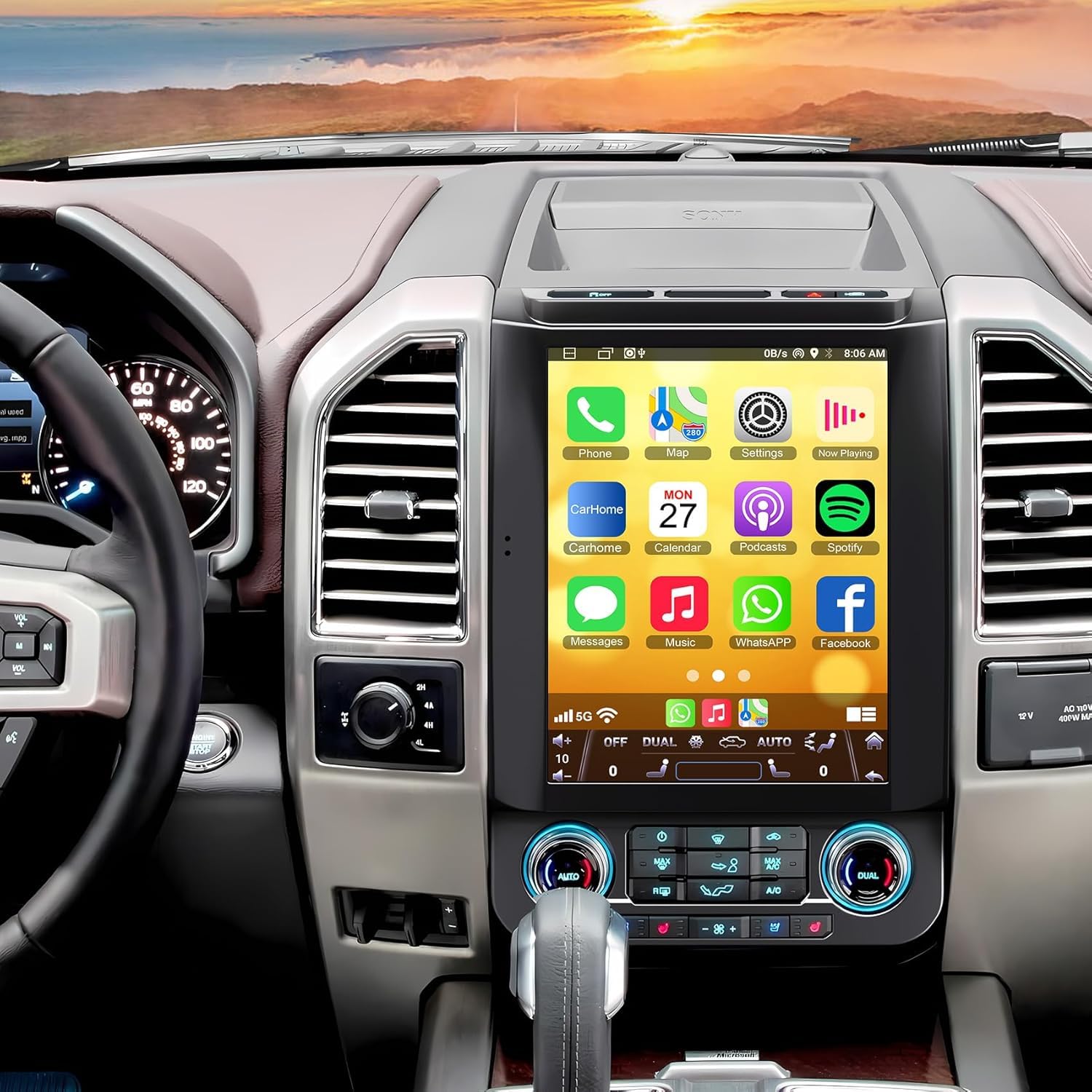
Running the latest Android 14 operating system out of the box, this 12.1-inch unit from Electrosmart brings modern software refinement to the Maverick’s dash. The 1024×768 IPS display isn’t as sharp as the 2K panels above, but for GPS, Spotify, and CarPlay usage it looks perfectly crisp. The 4GB RAM and 64GB ROM combination is the sweet spot for smooth app switching without overtaxing the budget.
The split-screen function is genuinely useful here — you can run Waze in the top half and music controls in the bottom without either app lagging. The bundle includes an HD night vision backup camera with a 170-degree wide angle and IP69 waterproof rating, saving you the extra purchase cost. Steering wheel control learning software maps your factory buttons seamlessly.
Sound quality out of the internal amp is a step down from premium units, with some owners noting weaker bass response through factory speakers. An external amplifier fixes this, but adds installation complexity and cost. The unit also lacks a physical volume knob, which some drivers miss for quick adjustments without looking away from the road.
What works
- Android 14 provides the most current software support
- Split-screen multitasking runs smoothly with 4GB RAM
- Includes full HD backup camera with night vision in the box
What doesn’t
- Internal amplification sounds thin through stock speakers
- No physical volume knob — all touch control only
5. SSXIE 12.1-Inch 8-Core for Ford F150 2015-2018
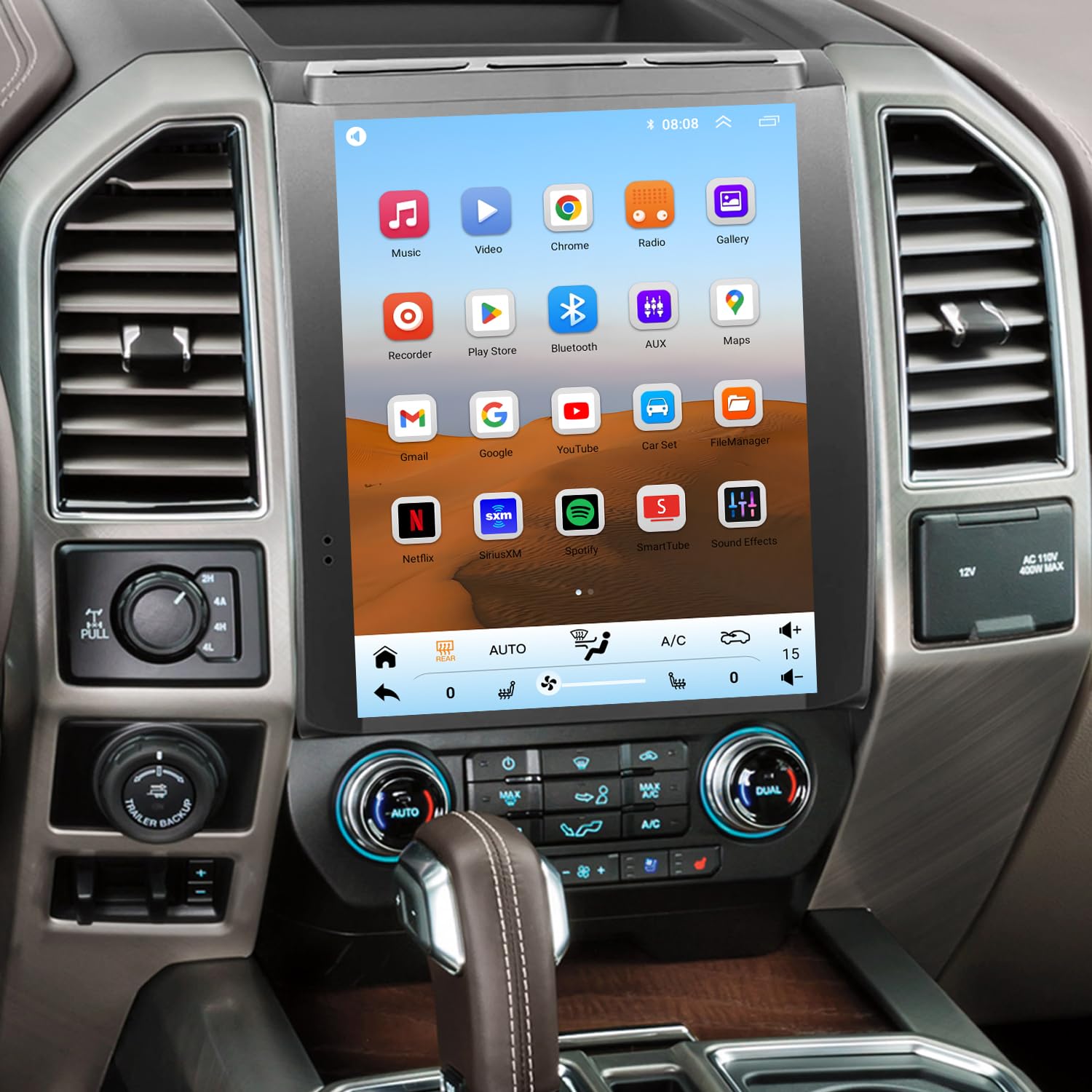
The SSXIE unit is the entry-level gateway to a large-screen Maverick upgrade, offering a 12.1-inch IPS touchscreen at a very accessible price point. The 2GB RAM and 32GB ROM configuration is lean — enough to run wireless CarPlay and basic navigation, but you’ll notice stuttering when switching between multiple apps or running split-screen modes. The IPS panel delivers decent color saturation for the price, though it washes out slightly from extreme driver-side viewing angles.
Wireless CarPlay works well for calls and music, and the unit retains factory steering wheel controls through a CANbus box that plugs directly into the factory harness. The 4K video output capability is surprising at this price, allowing you to play high-resolution media files on the large screen for passengers during road trips.
Long-term durability is the main concern here. Several owners report the unit starting to glitch and freeze after three to five months of daily use, likely due to thermal stress from the Maverick’s dash heating the low-cost processor. Brightness adjustment is also limited, making the display uncomfortably bright for night driving. This unit works well for short-term upgrades, but expect to replace it sooner than premium options.
What works
- 12.1-inch IPS screen at a very competitive entry price
- Wireless CarPlay and steering wheel control work out of the box
- 4K video playback is a nice bonus for media files
What doesn’t
- 2GB RAM causes lag when multitasking or using navigation
- Multiple reports of glitches and freezing after a few months
6. MekedeTech 10-Inch Android 13 for Ford Mustang 2010-2014

While listed for the Mustang, the 10-inch form factor is actually a better fit for the Maverick’s smaller dash opening, making installation cleaner without bezel overhang. The 4GB RAM and 32GB ROM combination strikes a reasonable balance between affordability and smooth performance, enough to run wireless CarPlay without the frustrating lag seen in 2GB units. The 1280×720 IPS display is bright and clear, though the resolution shows pixel edges up close compared to 2K panels.
The built-in DSP sound processing makes a noticeable difference through factory speakers, adding clarity and bass presence that the stock head unit lacks. Bluetooth 5.0 delivers stable streaming without dropout, and the unit supports 4G LTE via a SIM card for standalone internet connectivity. Installation is genuinely plug-and-play with the included CANbus interface for steering wheel control retention.
Several owners report that the included wiring instructions are confusing and some must purchase a separate 12V-to-5V step-down converter for systems with external amplifiers. The AC controls integration can also be finicky, with some climate functions not displaying correctly on the screen depending on your Maverick’s specific trim level. It is a capable upgrade if you are comfortable with some wiring detective work.
What works
- 10-inch size fits Maverick dash without bezel overhang
- DSP equalizer improves factory speaker sound quality
- Wireless CarPlay connects reliably via Bluetooth 5.0
What doesn’t
- Wiring instructions are vague and may frustrate beginners
- Some Maverick trims need extra step-down converter for install
7. LINKSWELL GEN 5 12.1-Inch for Ford F150 2015-2020
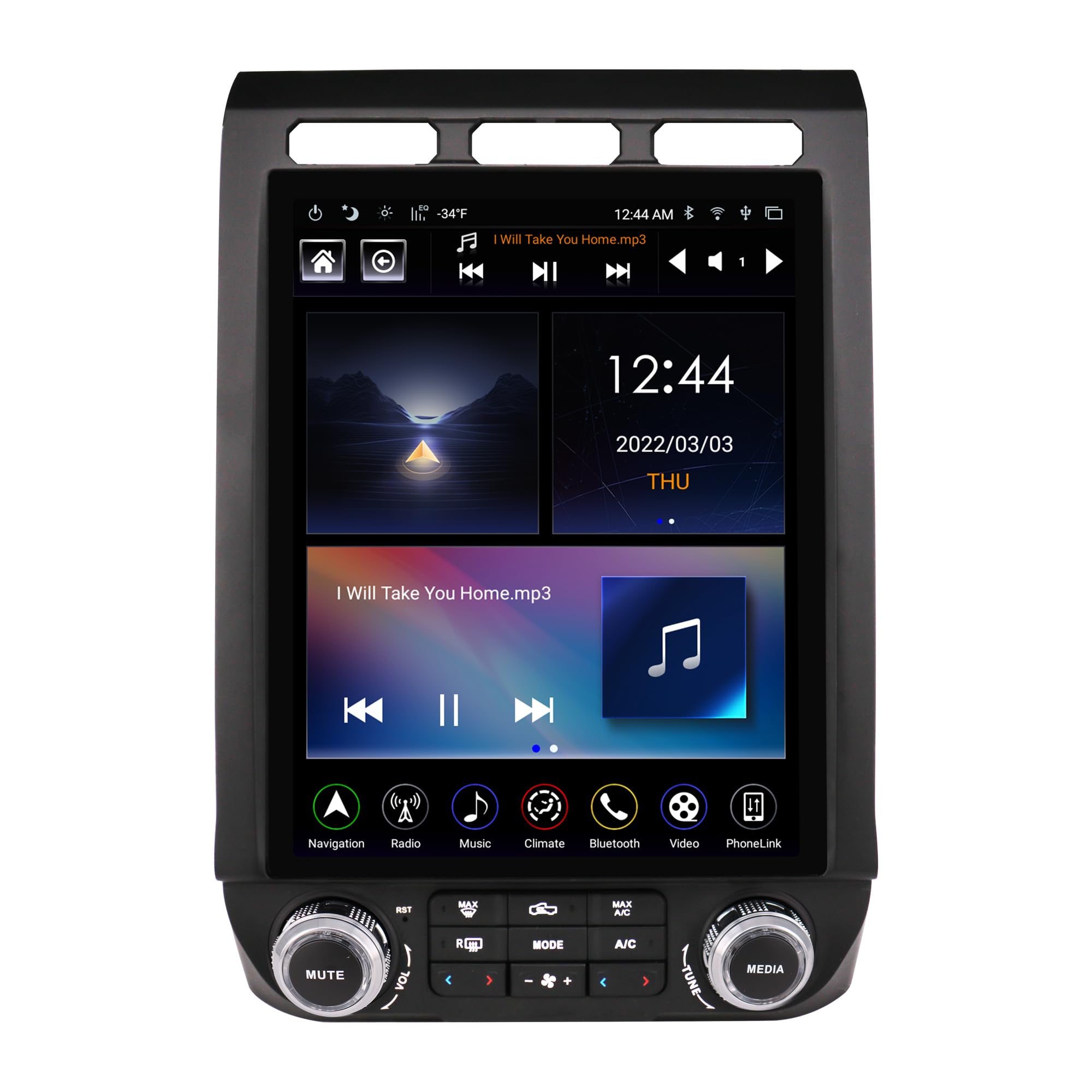
The LINKSWELL GEN 5 takes a different approach — rather than a floating tablet, it is a bezel-integrated replacement that perfectly matches the factory dash contours. The 12.1-inch screen sits flush with physical volume and tuning knobs on the bezel, plus dedicated climate control buttons that keep your most-used functions tactile and safe to operate without taking eyes off the road.
Wireless CarPlay and Android Auto are built in without requiring any dongle, and the electrical integration preserves factory massaging seat controls, heated/cooled seat functions, and the OEM camera on compatible trims. The 4GB RAM and 64GB ROM combo runs Android 9 – an older operating system, but it is paired with LINKSWELL’s stable firmware that prioritizes reliable CarPlay operation over flashy features. The DSP equalizer upgrades audio clarity noticeably compared to the stock Sync system.
The closed ecosystem is the biggest drawback — you cannot easily install third-party Android apps from the Play Store, so if you want to run YouTube or non-standard navigation apps on the screen, look elsewhere. Customer service responsiveness is also poor according to some reports, and a small number of units have failed completely within the first year with no warranty replacement path. For drivers who want a factory look and rock-solid CarPlay, this is great, but tinkerers will be frustrated.
What works
- Factory-matched bezel with physical knobs looks stock
- Preserves OEM heated/cooled seats and massaging functions
- Wireless CarPlay and Android Auto work reliably without lag
What doesn’t
- Closed Android system restricts third-party app installation
- Customer support responsiveness is inconsistent
Hardware & Specs Guide
RAM & ROM — The Multitasking Foundation
RAM determines how many apps your head unit can keep open simultaneously without reloading. In the Maverick, 4GB is the minimum for smooth split-screen use with navigation and music. 8GB ensures maps stay persistent in memory even after switching to CarPlay. For ROM, 64GB is adequate for offline maps and apps; 128GB allows storing larger media libraries locally. Avoid 2GB units unless you plan to run only CarPlay and nothing else.
Display Resolution and Panel Technology
Resolution directly impacts how sharp text and map details appear on screen. 1024×768 is the baseline for acceptable clarity. 1920×1200 (marketed as 2K) makes fine road labels legible at a glance. IPS (In-Plane Switching) panels provide consistent color and brightness from extreme driver and passenger angles, while cheaper TN panels wash out off-axis — a real problem from the Maverick driver seat where the dash angles away.
FAQ
Will a Ford F150 screen upgrade fit the Ford Maverick dash?
Do aftermarket screens keep the factory backup camera working?
How does wireless CarPlay connect and does it lag?
Final Thoughts: The Verdict
For most buyers, the ford maverick screen upgrade winner is the Electrosmart 12.1-Inch unit because it blends the latest Android 14 software with rock-solid 4GB RAM performance and a great 12.1-inch IPS display at a mid-tier wallet impact. If you want the absolute best processing power and sharpest 2K display, grab the Inexaccessories 14.5-Inch Qualcomm unit. And for a factory-matched look with physical knobs and full climate integration that feels OEM, nothing beats the LINKSWELL GEN 5.

Certification: BSc in Mechanical Engineering
Education: Mechanical engineer
Lives In: 539 W Commerce St, Dallas, TX 75208, USA
Md Amir is an auto mechanic student and writer with over half a decade of experience in the automotive field. He has worked with top automotive brands such as Lexus, Quantum, and also owns two automotive blogs autocarneed.com and taxiwiz.com.